Why I built it
I first came across Strata through Codacus’s video, This Engine Makes 177B Qwen 3.8 Flash Extremely Fast with 12GB GPU. It introduced me to the project and made me curious about what the same approach could do on my own hardware. Codacus is also an excellent channel for practical local-LLM projects, performance testing and new inference tools.
I wanted to find out how far I could push a modest AI homelab: one Proxmox host, 56 GiB assigned to a VM, and a 12 GiB RTX 3060. The target was not a small model. I specifically wanted the original Qwen3.8-Flash-Next family in Strata’s IQ3_S quantization, with a 32,768-token context window and no vision support.
What I built
The final result is a working local web interface and OpenAI-compatible API. The model uses almost all of the RTX 3060, keeps most experts in system RAM, and generated at roughly 36–38 tokens per second in my tests. It also exposed an important failure mode: High reasoning can consume thousands of tokens without ever reaching the final answer unless a reasoning budget is configured.
This post documents the complete build, every command I used, the problems I encountered, the measured performance, and what I learned from testing the model.
Scope and safety: My final server listens on
0.0.0.0:8080without authentication because I deliberately chose to use it only on a trusted private network. This is not suitable for an untrusted LAN or the public internet. Do not forward port 8080 from a router. Strata’s own documentation recommends an API key whenever the service is reachable beyond loopback.
What is Strata?
Strata is an open-source local inference stack for Qwen3.8-Flash-Next and related variants. It combines:
- A C++ inference engine with CUDA and HIP backends.
- A Python server with OpenAI- and Anthropic-compatible endpoints.
- A browser-based chat and monitoring interface.
- An installer that selects a model layout based on GPU VRAM, system RAM, CPU features, and available disk space.
Qwen3.8-Flash-Next is a mixture-of-experts model. Strata does not need to fit the entire model into VRAM. It places dense components and a cache of frequently used experts on the GPU, keeps the remaining experts in system RAM when possible, and uses the CPU and GPU together during generation. It also uses an MTP draft layer for speculative decoding.
For this build, Strata’s hardware check estimated that IQ3_S needed about 62 GB of combined room and could run in automatic low-RAM mode. The 12 GiB GPU would cache only a fraction of the experts; the rest would remain in RAM.
Hardware and final VM specification
Proxmox host
| Component | Specification |
|---|---|
| Hypervisor | Proxmox VE 9.2.11 |
| CPU | Intel Core Ultra 7 265K |
| Logical CPUs visible to Proxmox | 20 |
| Host RAM | Approximately 62.07 GiB usable |
| Host idle RAM use | Approximately 2.3–2.4 GiB with other guests stopped |
| Host swap | 8 GiB |
| GPU | NVIDIA GeForce RTX 3060 12 GB, GA106 |
| GPU functions | VGA plus NVIDIA HDMI/DisplayPort audio |
| IOMMU | Enabled and already tested |
Only this AI VM is intended to run while the model is loaded. The same passthrough GPU must never be attached to two running VMs at once.
Actual VM configuration used
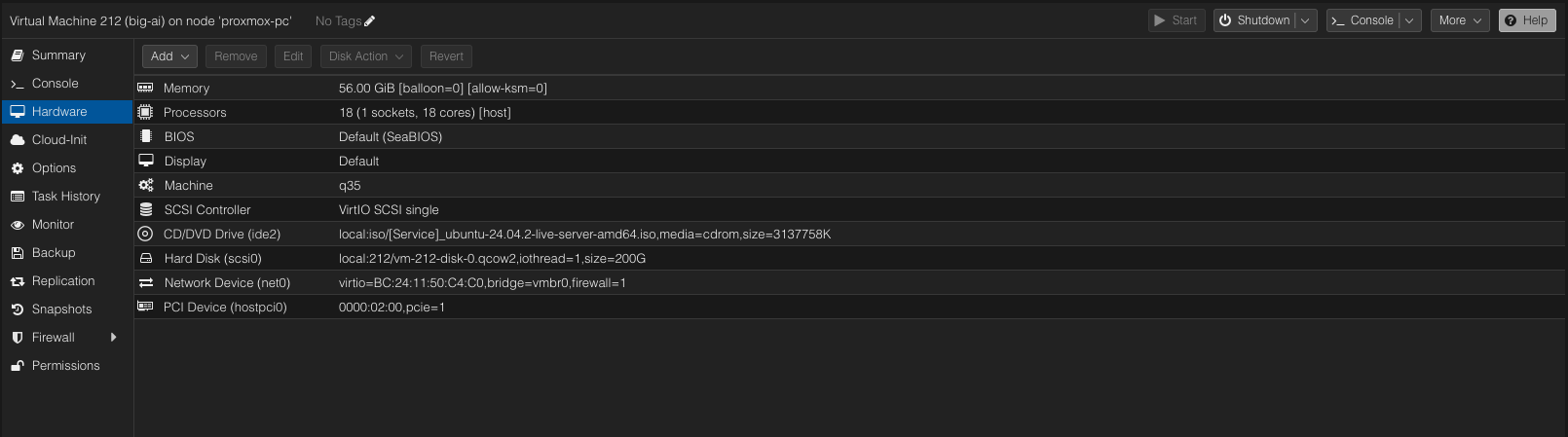
| Setting | Value |
|---|---|
| VM name | big-ai |
| Machine | q35 |
| BIOS | SeaBIOS |
| CPU | 1 socket, 18 cores, type host |
| Memory | 56 GiB fixed |
| Ballooning | Disabled |
| KSM | Disabled for this VM |
| Disk | One 200 GiB QCOW2 disk |
| Disk bus | SCSI |
| SCSI controller | VirtIO SCSI Single |
| I/O thread | Enabled |
| Network | VirtIO on vmbr0 |
| GPU | Passed through as a PCIe device with all functions |
| Virtual display | Retained for the VM console |
| Autostart | Disabled |
I originally considered a 250 GiB disk. I ultimately continued with the existing 200 GiB disk and accepted the tighter free-space margin. I also did not enable Proxmox SSD emulation or discard for this run.
Why I rebuilt the VM with Ubuntu 24.04
An earlier experimental VM used Ubuntu 26.04. Strata’s automatic CUDA path recognized Ubuntu 22.04 and 24.04, so setup stopped on 26.04. I also tried manually starting a CUDA Toolkit 13.4 installation, but the NVIDIA repository transferred at only about 35 KB/s and projected more than a day to finish.
The previous VM was deleted because there was no data worth preserving. I rebuilt with Ubuntu Server 24.04 LTS to stay on Strata’s fully supported automatic path. The attached installation ISO was Ubuntu 24.04.2, and a normal system upgrade brought the installed OS to Ubuntu 24.04.5.
Updating Ubuntu
After installing Ubuntu Server and selecting OpenSSH Server, I updated the system:
sudo apt updatesudo apt upgradeI then rebooted:
sudo rebootAfter reconnecting over SSH, I verified the release:
cat /etc/os-releaseThe important result was:
PRETTY_NAME="Ubuntu 24.04.5 LTS"
VERSION="24.04.5 LTS (Noble Numbat)"
Verifying GPU passthrough
Before installing an NVIDIA driver, I checked that the VM could see both PCI functions:
lspci -nnk | grep -A3 -i nvidiaThe VM detected:
NVIDIA GA106 [GeForce RTX 3060 Lite Hash Rate]- The NVIDIA High Definition Audio Controller
nouveauas the initial kernel driver for the VGA functionsnd_hda_intelfor the audio function
That confirmed the Proxmox passthrough configuration was working. The open-source nouveau driver was expected at this stage.
Running nvidia-smi before installing the proprietary driver returned command not found and listed several available utility packages. Rather than installing only the utility, I checked Ubuntu’s driver recommendation:
ubuntu-drivers devicesUbuntu recommended the standard open-kernel-module branch:
nvidia-driver-595-open - distro non-free recommendedI installed the matching driver and utilities together:
sudo apt install -y nvidia-driver-595-open nvidia-utils-595Then I rebooted again:
sudo rebootThe final driver verification was:
nvidia-smiKey results:
| Metric | Result |
|---|---|
| Driver | 595.99.02 |
| CUDA compatibility reported by driver | 13.2 |
| GPU | NVIDIA GeForce RTX 3060 |
| VRAM | 12,288 MiB |
| Idle GPU memory | Approximately 1 MiB before Strata |
The CUDA version shown by nvidia-smi is the highest CUDA API level supported by the driver; it does not necessarily mean a full CUDA Toolkit is already installed.
Checking VM resources
I verified memory:
free -hBefore loading Strata, Ubuntu reported:
Mem: 54Gi total, 53Gi available
Swap: 8.0Gi total, 0B used
I checked the root filesystem:
df -h /Before installing the model, the 200 GiB virtual disk appeared as a 196 GiB root filesystem with 174 GiB available.
Finally, I checked the CPU and AVX2 support:
lscpu | grep -E 'Architecture|Model name|avx2'The VM exposed the Intel Core Ultra 7 265K correctly, and the CPU flags included AVX2.
Installing the prerequisites and cloning Strata
I installed only the basic tools needed for the setup:
sudo apt install -y git tmux curl python3-venvThen I cloned Strata:
git clone https://github.com/Niko1221/Strata.gitcd ~/StrataBefore starting a large download, I ran Strata’s hardware-only check:
./setup.sh --checkThe check detected:
[ok] GPU: NVIDIA GeForce RTX 3060, 12.0 GB VRAM, compute capability 8.6, driver 595.99.02
[ok] RAM: 55 GB
[ok] CPU: Intel(R) Core(TM) Ultra 7 265K (AVX2)

IQ3_S needs ~62 GB RAM: fits in the low-RAM mode
It estimated that the GPU would hold roughly 14% of the experts, with the remainder in system RAM.
Installing IQ3_S in tmux
The installation could run for a long time, so I used tmux to protect it from an SSH disconnect:
tmux new -s strata-installInside tmux, I ran the noninteractive setup command:
./setup.sh --yes --family qwen --model IQ3_S --context 32768 --vision no --no-startImportant choices in this command:
--family qwenselects the original model family.--model IQ3_Sprevents the installer from automatically choosing a smaller quantization for 55 GB of RAM.--context 32768sets a 32K context window.--vision noavoids the image encoder and its extra VRAM use.--no-startinstalls everything without blocking the setup shell in the server process.- I did not force a low-RAM flag; Strata selected the correct mode automatically.
If SSH disconnects, the session can be restored with:
tmux attach -t strata-installTo detach without stopping the installation, press Ctrl+B, release both keys, and then press D.
The setup finished successfully and created:
run-iq3_s.shIt also displayed this warning:
the model is on a rotational disk (sda): its n-gram table is read from it at random, which can stall prompts for minutesThe guest sees /dev/sda as rotational because SSD emulation was not enabled in the VM configuration. That does not prove that the physical Proxmox storage is a spinning disk, but it means the guest and Strata cannot assume SSD behavior. Strata’s n-gram table is about 28.8 GB and is sensitive to random-read latency.
After installation, disk use was:
df -h /Filesystem Size Used Avail Use%
/dev/sda2 196G 156G 30G 84%The complete installation therefore consumed approximately 143 GiB beyond the initial Ubuntu footprint and left only 30 GiB free. A 250 GiB VM disk would provide more comfortable operational headroom.
Starting Strata
I started the generated script from the Strata directory:
./run-iq3_s.shThe first load copied roughly 55 GB of expert data into RAM, filled the GPU expert cache, and temporarily made the VM less responsive. The startup log reported:
filling the GPU's expert cache (2655 experts, 5.09 GiB of VRAM)At first, 5.09 GiB looked surprisingly low for a 12 GiB GPU. That number refers only to the expert cache. The rest of the VRAM holds the attention and DeltaNet components, routers, shared experts, output head, MTP draft layer, KV cache, prompt buffers, CUDA context, and safety headroom.
With the model loaded, I measured total GPU allocation:
nvidia-smi --query-gpu=memory.total,memory.used,memory.free --format=csvmemory.total [MiB], memory.used [MiB], memory.free [MiB]
12288 MiB, 11545 MiB, 367 MiBStrata was therefore using almost the entire card as intended.
Verifying the web server and API
I checked the health endpoint inside the VM:
curl http://127.0.0.1:8080/healthThe response confirmed the exact model and configuration:
{
  "status": "ok",
  "max_context": 32768,
  "model": "qwen3.8-flash-next-iq3_s",
  "images": false,
  "api_key": false,
  "loaded": true,
  "service": "strata"
}
I checked the OpenAI-compatible model list:
curl http://127.0.0.1:8080/v1/modelsThe returned model ID was:
qwen3.8-flash-next-iq3_sFinally, I sent a real completion request:
curl http://127.0.0.1:8080/v1/chat/completions -H 'Content-Type: application/json' -d '{"model":"qwen3.8-flash-next-iq3_s","messages":[{"role":"user","content":"Reply with exactly: Strata is working"}],"max_tokens":32,"reasoning_effort":"none"}'The model returned exactly:
Strata is workingThe API timing data for this very short request was:
| Metric | Result |
|---|---|
| Prompt tokens | 20 |
| Prompt processing | 40.1 tokens/s |
| Generated tokens | 5 |
| Generation | 37.8 tokens/s |
| Draft tokens accepted | 3 of 3 |
Short prompts are dominated by fixed overhead, so this is primarily a functional test rather than a full performance benchmark.
Making Strata reachable on my private LAN
Strata defaults to 127.0.0.1. I initially planned to use an SSH tunnel, but I chose to make the server directly reachable on my trusted LAN. I stopped the server and restarted it with:
./setup.sh --host 0.0.0.0This setting was saved in the model configuration. The startup summary then showed:
server 0.0.0.0:8080From my Mac, I tested the VM directly:
curl http://192.168.1.129:8080/healthThe response showed loaded: true. The browser interface and API were then available at:
Web interface: http://192.168.1.129:8080
OpenAI API:    http://192.168.1.129:8080/v1
Anthropic API: http://192.168.1.129:8080/v1/messages
I did not add a guest firewall rule or configure an API key for this experiment. That was a deliberate choice for my isolated, trusted LAN—not a recommendation for an internet-facing deployment. The Proxmox firewall was already enabled on the virtual network device, but no extra filtering was added for port 8080.
Real resource use and performance
Loaded but idle
With IQ3_S loaded, Strata used:
- Approximately 11.5 GiB of the RTX 3060’s 12 GiB VRAM.
- Approximately 50 GiB of the VM’s 54 GiB usable RAM.
- A 5.09 GiB GPU expert cache containing 2,655 experts.
- A 45.15 GiB resident RAM complement for experts not currently cached on the GPU.
The VM still had an 8 GiB swap device, but swap was initially unused. Because the configuration runs close to the RAM limit, I keep other VMs and unnecessary services stopped.
Under a demanding reasoning prompt
During the longer reasoning test, neofetch and nvidia-smi reported:
| Resource | Measurement |
|---|---|
| VM memory | 50,475 MiB used of 56,236 MiB |
| GPU utilization | 100% |
| GPU memory | 11,665 MiB used of 12,288 MiB |
| GPU power | 156 W of 170 W |
| GPU temperature | 80°C |
| GPU fan | 77% |
| Strata engine GPU memory | 11,564 MiB |
This confirmed that the workload was compute-active rather than hung. At 80°C and 156 W, the card was under a sustained heavy load, so temperature, fan behavior, and case airflow are worth monitoring during longer sessions.
The first serious prompt and the reasoning-loop problem
For a stronger reasoning test, I used this prompt:
Expand the exact active-active payment-system prompt
You are reviewing the design of an active-active payment service. Do not use external tools.

System:

- Two regions, A and B, can both receive payment requests.
- Each region has its own PostgreSQL database.
- Database replication between regions is asynchronous and may lag by five minutes.
- Kafka delivery is at least once, so messages can be duplicated.
- Clients retry requests after timeouts.
- The external bank accepts an idempotency key and guarantees that requests using the same key cause at most one charge.
- A network partition can completely isolate the regions for five minutes.
- The request path may not synchronously contact the other region.
- Distributed transactions are unavailable.

Proposed requirements:

1. Either region must accept payments during a partition.
2. Every accepted request must return success within 300 ms.
3. A customer must never be charged twice.
4. A payment acknowledged as successful must never be lost.
5. Payment status must never move backward, even after replication conflicts and failover.

Answer in no more than 1,200 words:

A. Determine whether all five requirements can be guaranteed simultaneously. Give a concrete failure execution or proof; do not merely cite CAP.

B. If they cannot all be guaranteed, identify the smallest requirement change needed. Explain precisely what behavior changes.

C. Design the system under that revised requirement. Include:

- Idempotency-key generation and ownership
- Database tables, unique constraints, and payment state machine
- Transactional outbox/inbox behavior
- Bank-call retry and reconciliation logic
- Cross-region replication-conflict handling
- Failover behavior during and after a partition

D. Give six adversarial tests. For each test, state the injected failure and the invariant that must remain true.

E. Finish with:

- Three assumptions your design depends on
- Two facts you would verify before implementation
- One remaining limitation that the design cannot eliminate

Do not claim "exactly once" without explaining the mechanism. Distinguish clearly between preventing duplicate bank charges and preventing duplicate internal processing.
I selected High reasoning. The web interface showed approximately 32 tokens/s, the GPU remained at 100%, and the model continued producing internal reasoning without showing a final answer.
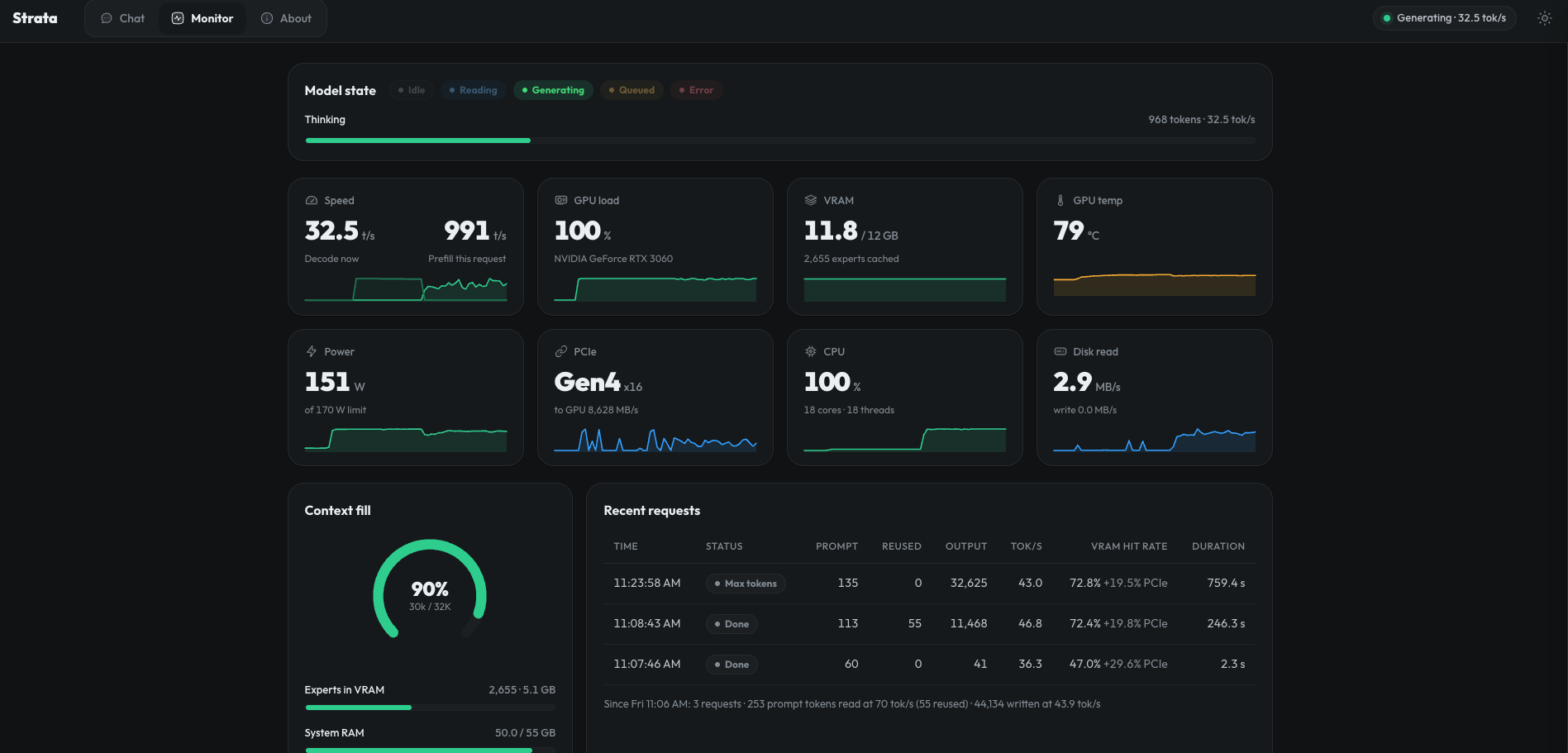
After manually stopping the request, I inspected the log:
tail -n 40 ~/Strata/strata-iq3_s.logThe log explained exactly what happened:
| Metric | Result |
|---|---|
| Prompt size | 492 tokens |
| Prompt time | 1,334 ms |
| Prompt throughput | 368.8 tokens/s |
| Generated tokens before cancellation | 18,324 |
| Generation time | 505,854 ms, about 8 minutes 26 seconds |
| Generation speed | 36.2 tokens/s |
| MTP drafts accepted | 8,206 of 13,610, about 60.3% |
| Decode expert-cache hit rate | 77.5% |
| Expert-cache hits | 7,426,734 |
| Additional routes served over PCIe/other tier | 15.9% of routed work |
| Resident expert RAM | 45.15 GiB |
| Adaptive VRAM-tier exchanges | 67,648 |
This was not a 32K-context problem. The prompt plus generated reasoning used fewer than 19,000 tokens. Increasing the context to 128K would only allow the model to continue the reasoning loop for much longer while consuming additional KV-cache memory.
The correct fix was to cap reasoning, not expand context.
Adding a 4,096-token reasoning budget
I stopped the server with Ctrl+C in tmux and backed up the model configuration:
cp ~/Strata/strata-iq3_s.json ~/Strata/strata-iq3_s.json.before-reasoning-budgetI added a global 4,096-token reasoning budget:
python3 -c 'import json; from pathlib import Path; p=Path.home()/"Strata/strata-iq3_s.json"; d=json.loads(p.read_text()); d["reasoning_budget_tokens"]=4096; p.write_text(json.dumps(d, indent=2) + "\n")'I verified the saved value:
grep -n '"reasoning_budget_tokens"' ~/Strata/strata-iq3_s.json40: "reasoning_budget_tokens": 4096Then I restarted Strata:
cd ~/Strata./run-iq3_s.shThe reasoning budget lets me keep High reasoning while ensuring that Strata inserts a wrap-up instruction after 4,096 thinking tokens and gives the model room to produce the final answer.
Testing output quality with a generated website
For a practical instruction-following test, I asked the model for a complete single-file DevOps portfolio. The exact original wording was not retained, but the request was equivalent to:
Create a complete single-file portfolio website for Sid, a DevOps Engineer, using generic placeholder data. Put all HTML, CSS, and JavaScript in one index.html file and make it responsive and interactive.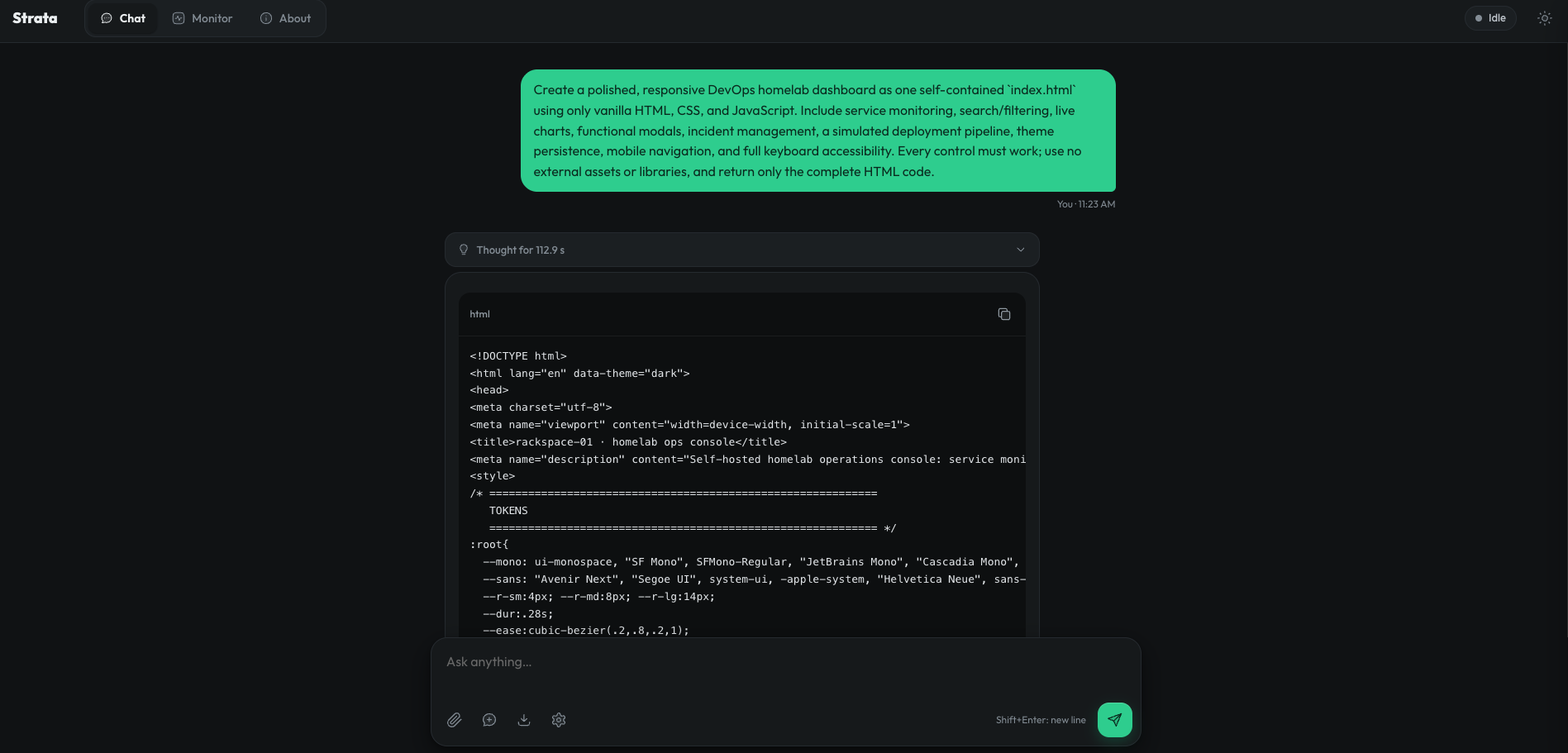
The model produced a complete index.html that was:
- 1,295 lines long.
- 35,293 bytes.
- Fully self-contained, with no external dependencies.
- Responsive across desktop and mobile layouts.
- Immediately renderable after removing the surrounding Markdown code fence.
The page included:
- A sticky responsive navigation bar.
- A polished dark DevOps visual theme.
- A hero section with metrics and a terminal-style panel.
- About, skills, experience, projects, certifications, and contact sections.
- Mobile navigation.
- Scroll-reveal behavior.
- Active-section highlighting.
- A mailto-based contact form.
- Basic semantic HTML and accessibility labels.
What the model did well
The strongest part of the output was completeness. The HTML closed correctly, the CSS was organized around reusable variables and components, and the JavaScript interactions were implemented rather than described. The page rendered successfully without a build step. It followed the single-file requirement cleanly and required no code repair before previewing.
The model also made sensible responsive choices: multi-column sections collapsed at smaller breakpoints, the main navigation became a menu, and the visual hierarchy remained coherent on a narrow viewport.
What still needs human editing
The content was intentionally generic. Before using it as a real portfolio, I would replace:
sid@example.com- Placeholder GitHub and LinkedIn URLs
- Example employers and dates
- Generic project descriptions
- Placeholder certifications
- The alert-based resume link
- Self-assessed progress percentages
The contact form only opens a local email client; it has no backend. The result is a strong frontend prototype, not a finished production portfolio.
A stronger short frontend test prompt
For future comparisons against online models, I condensed the request into this stricter prompt:
Create a polished, responsive DevOps homelab dashboard as one self-contained index.html using only vanilla HTML, CSS, and JavaScript. Include service monitoring, search/filtering, live charts, functional modals, incident management, a simulated deployment pipeline, theme persistence, mobile navigation, and full keyboard accessibility. Every control must work; use no external assets or libraries, and return only the complete HTML code.This is a better quality test than asking for a static landing page because it checks state management, accessibility, responsive design, JavaScript correctness, and whether every promised control actually works.
Performance summary
| Test | Prompt performance | Decode performance | Notes |
|---|---|---|---|
| Minimal API check | 40.1 tok/s | 37.8 tok/s | Only 20 prompt tokens and 5 output tokens; overhead-dominated |
| Active-active payment prompt | 368.8 tok/s | 36.2 tok/s | 492-token prompt, 18,324 reasoning tokens before manual cancellation |
| Observed browser status during reasoning | — | Approximately 32 tok/s | Live UI estimate while GPU was at 100% |
The stable long-run decode figure on this hardware was approximately 36 tokens per second. That is fast enough for interactive use, although High reasoning can add several minutes of latency when allowed to run unbounded.
The important architectural result is that the 12 GiB RTX 3060 was fully utilized even though the log described only a 5.09 GiB expert cache. Total VRAM use was approximately 11.5–11.7 GiB, while the VM used roughly 50 GiB of RAM. Strata’s split between fixed GPU components, cached experts, resident RAM experts, and CPU computation behaved as designed.
Problems encountered and their resolutions
| Problem | Cause | Resolution |
|---|---|---|
| Ubuntu 26.04 setup stopped | Strata’s automatic CUDA setup recognized Ubuntu 22.04 and 24.04 | Rebuilt with Ubuntu Server 24.04 LTS |
| NVIDIA download projected more than a day | Repository transferred at roughly 35 KB/s | Abandoned the old VM; the new supported setup later completed successfully |
nvidia-smi initially missing |
Only nouveau was active and NVIDIA utilities were not installed |
Installed nvidia-driver-595-open and nvidia-utils-595 together, then rebooted |
| 5.09 GiB expert-cache figure looked too low | It described only the expert cache, not total VRAM use | Verified 11,545 MiB total GPU memory use with nvidia-smi |
| Rotational-disk warning | The virtual disk was not presented with SSD emulation | Accepted for this run; future improvement is to enable SSD emulation/discard when appropriate |
| Only 30 GiB disk space remained | IQ3_S, its prepared expert data, MTP files, engine, environment, and Ubuntu consumed most of the 200 GiB disk | Continued carefully; a 250 GiB disk remains the better long-term choice |
| High-reasoning request appeared stuck | The model generated 18,324 reasoning tokens without transitioning to the answer | Added "reasoning_budget_tokens": 4096 to the model configuration |
| Concern that 32K context was too small | The failed request used fewer than 19K total tokens | Kept 32K; a larger context would not fix the reasoning loop |
| LAN access unavailable by default | Strata listened only on 127.0.0.1 |
Restarted with ./setup.sh --host 0.0.0.0 on a trusted private network |
Complete command history
The following is the practical command sequence used during this build:
sudo apt update
sudo apt upgrade
sudo reboot
cat /etc/os-release
lspci -nnk | grep -A3 -i nvidia
nvidia-smi
ubuntu-drivers devices
sudo apt install -y nvidia-driver-595-open nvidia-utils-595
sudo reboot
nvidia-smi
free -h
df -h /
lscpu | grep -E 'Architecture|Model name|avx2'
sudo apt install -y git tmux curl python3-venv
git clone https://github.com/Niko1221/Strata.git
cd ~/Strata
./setup.sh --check
tmux new -s strata-install
./setup.sh --yes --family qwen --model IQ3_S --context 32768 --vision no --no-start
df -h /
./run-iq3_s.sh
nvidia-smi --query-gpu=memory.total,memory.used,memory.free --format=csv
curl http://127.0.0.1:8080/health
curl http://127.0.0.1:8080/v1/models
curl http://127.0.0.1:8080/v1/chat/completions -H 'Content-Type: application/json' -d '{"model":"qwen3.8-flash-next-iq3_s","messages":[{"role":"user","content":"Reply with exactly: Strata is working"}],"max_tokens":32,"reasoning_effort":"none"}'
./setup.sh --host 0.0.0.0
curl http://192.168.1.129:8080/health
tail -n 40 ~/Strata/strata-iq3_s.log
cp ~/Strata/strata-iq3_s.json ~/Strata/strata-iq3_s.json.before-reasoning-budget
python3 -c 'import json; from pathlib import Path; p=Path.home()/"Strata/strata-iq3_s.json"; d=json.loads(p.read_text()); d["reasoning_budget_tokens"]=4096; p.write_text(json.dumps(d, indent=2) + "\n")'
grep -n '"reasoning_budget_tokens"' ~/Strata/strata-iq3_s.json
cd ~/Strata
./run-iq3_s.sh
Final assessment
IQ3_S is viable on this machine, but it operates near the limits of the VM. Strata successfully combines the RTX 3060’s 12 GiB VRAM with approximately 50 GiB of system RAM, delivering around 36–38 tokens per second in sustained generation. The model was capable of producing a large, coherent, immediately renderable frontend in one response.
The experience also showed why local-model evaluation must look beyond a single tokens-per-second number. Memory tiering, disk behavior, expert-cache hit rate, speculative draft acceptance, prompt processing, reasoning policy, and client-side output handling all affect the practical result.
The most valuable configuration change was not more context or a smaller quantization. It was the 4,096-token reasoning budget. That change preserved the IQ3_S model and High reasoning while preventing an otherwise healthy engine from spending minutes generating an internal monologue without delivering an answer.
For my homelab, the final balance is:
- Original Qwen3.8-Flash-Next family.
- IQ3_S quality.
- 32K context.
- Vision disabled.
- Automatic low-RAM mode.
- 12 GiB RTX 3060 nearly fully occupied.
- Approximately 50 GiB VM RAM in use.
- Roughly 36 tokens/s sustained decode.
- Browser UI plus OpenAI- and Anthropic-compatible APIs.
That is an impressive amount of local-model capability from a single consumer GPU, provided the system is given enough RAM, disk space, cooling, and sensible generation limits.